Abnormal noise in a welding machine can signal more than ordinary operating vibration. A sharp buzz, grinding sound, clicking rhythm, or sudden hum deserves attention. Ignoring it may damage motors, fans, transformers, bearings, or cooling systems. It can also affect arc stability and weld quality. This guide explains how to identify unusual sounds and choose practical repair steps.
How to troubleshoot abnormal noise in welding machines starts with careful observation. Note when the sound begins, such as during startup, idle operation, or active welding. Check whether the noise changes with welding current, fan speed, or cable movement. A loose cover may rattle like thin metal, while a worn bearing often produces a rough grinding tone. Electrical humming can come from transformers, coils, or loose internal connections. These sounds may appear similar, but their causes differ.
Safety must control every inspection. Disconnect power, follow the manufacturer’s service instructions, and allow hot components to cool. Only qualified technicians should open energized equipment or test internal circuits. A flashlight, listening probe, and maintenance record can reveal useful patterns. Noise diagnosis is not always neat. One loose screw can imitate a serious mechanical failure. Dust can also hide the real cause. That uncertainty deserves respect, not guesswork. Experienced technicians compare sound, temperature, vibration, and weld performance before replacing parts. Reliable repairs use approved components and documented testing. If the noise continues after basic checks, professional service is the safer decision.
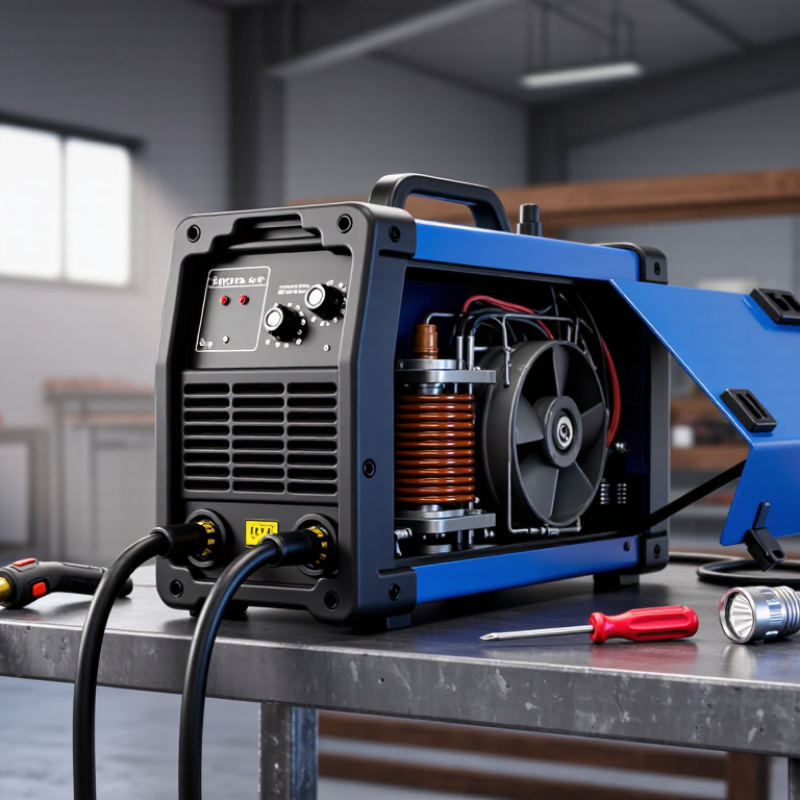
Abnormal noise in a welding machine is often an early warning, not a harmless annoyance. A steady hum usually comes from normal electrical operation. A new buzz, crackle, rattle, or grinding sound means something has changed. The sound’s timing matters. Noise during startup can suggest a fan, relay, or loose panel. Noise only under load may point to poor connections, overheating, or unstable power. Do not treat every sound as the same symptom.
In field inspections, I first disconnect power and allow stored energy to discharge. I check the fan, vents, covers, cables, and work clamp without opening energized equipment. A blocked vent can make airflow roar, while dust can make a fan vibrate. A loose connection may produce sharp crackling and dangerous heat. That issue needs qualified electrical service, not repeated welding tests. Stop immediately. Never silence a warning with oil or tape.
I have misread a vibrating cover as an internal fault before. That mistake delayed the real repair. Sound should be checked with temperature, output stability, error indicators, and visible damage. A brief recording can help a technician compare the noise safely. If the noise continues after cleaning external vents and tightening accessible hardware, remove the machine from service. Some diagnosis remains uncertain without electrical measurements. A trained technician can test insulation, cooling performance, and power components with proper instruments. Keep a maintenance log; patterns often reveal whether noise follows heat, load, or movement.
Abnormal noise usually indicates a change in a rotating, electrical, cooling, or gas-flow component. The chart shows typical dominant frequency references that can help identify the likely source.
Inspect transformer mounting, laminations, loose screws, and input-power connections. Disconnect power before opening the machine.
Check fan blades, guards, bearings, and dust buildup. Replace damaged or rough-running components.
Stop operation and inspect loose panels, fasteners, shaft alignment, and bearing play before continuing to weld.
Check shielding-gas pressure, leaks, regulator condition, torch connections, and unstable arc settings.
The frequency values are typical engineering reference points: 50/60 Hz power systems, approximately 20–35 Hz fan rotation, common mechanical vibration bands, and high-frequency arc or gas-flow noise. Actual readings vary by machine design and operating condition.
Abnormal noise in a welding machine often reveals a developing fault. A steady, soft hum can come from the transformer or cooling fan. A loud buzz may indicate loose panels, vibrating coils, or unstable electrical connections. Listen closely. The sound usually changes when the welding current increases.
Sharp crackling often points to an uneven arc. Dirty workpieces, poor grounding, worn electrode holders, or unsuitable settings can cause it. A grinding sound from the fan area may suggest damaged bearings or trapped dust. Clicking can come from a relay or internal switch, but repeated clicking deserves inspection. Not every noise means immediate failure. Still, ignoring a new sound is risky.
In workshop practice, I check whether the noise appears during startup, welding, or cooling. I also inspect airflow, cable connections, and unusual heat marks after disconnecting power. Never remove covers while the machine is energized. A qualified technician should test internal components, especially capacitors, transformers, and control boards. Some operators replace electrodes or tighten terminals too quickly, while the real cause is restricted ventilation. That mistake is easy to make. Keep a short record of the noise, welding current, duty cycle, and operating temperature. These details help separate normal vibration from a fault that may worsen.
Abnormal Noise in Welding Machines: How to Diagnose the Source of Unusual Sounds
A welding machine should produce a steady fan tone and a controlled electrical hum. Sudden buzzing, grinding, clicking, or rattling deserves inspection. I usually begin by stopping the weld and recording when the sound appears. Does it occur during startup, under load, or after several minutes? This timing often separates cooling-fan problems from transformer vibration or loose internal hardware.
With power isolated, check the fan guard, mounting screws, cable connections, and ventilation openings. A dry or damaged fan bearing may produce a sharp grinding sound. A loose cover can create a metallic rattle that changes with vibration. Buzzing during welding may indicate loose laminations, poor connections, or unstable input power. Do not open energized equipment. A qualified technician should test capacitors, relays, and insulation safely.
Noise exposure also matters during diagnosis. NIOSH recommends limiting occupational exposure to 85 dBA over eight hours, using a 3 dB exchange rate. OSHA’s permissible exposure limit is 90 dBA over eight hours, using a 5 dB exchange rate. Use a calibrated sound meter near the operator’s ear, not a phone alone. Compare readings with normal operating conditions and record the welding current. I once blamed a fan for a buzzing fault, but the actual cause was a vibrating side panel. That mistake showed why sound location, temperature, and load must be checked together. Stop operation if noise combines with burning smells, smoke, overheating, or unstable arcs.
Abnormal noise in a welding machine often signals a mechanical or electrical problem. A steady fan hum is normal, but grinding, buzzing, clicking, or rattling deserves attention. Stop welding and disconnect the power supply. Let the machine cool completely. Do not open the casing while capacitors may still hold electricity.
Begin by checking the outside. Tighten loose screws, handles, panels, and cable connections. Inspect the cooling fan for dust, bent blades, or trapped wire fragments. A soft brush and low-pressure air can remove debris. Keep air vents clear. If the noise changes when the fan speeds up, a worn bearing may be responsible. The fan usually needs replacement, not lubrication.
Next, test the welding leads, electrode holder, and work clamp. Damaged insulation, loose terminals, or poor grounding can create buzzing and unstable arcs. Reconnect each fitting firmly, then try a short weld at the correct current setting. Listen carefully. I once blamed the transformer for a rattling sound, but a loose side panel caused it. That mistake taught me to check simple faults first.
If the sound remains, inspect the machine through a qualified repair technician. Internal transformers, relays, and cooling components require measured testing. Never bypass a fuse or continue using equipment with burning smells, smoke, sparks, or sudden output changes. Record when the noise starts, its pitch, and the welding conditions. These details can shorten diagnosis, although sound alone cannot prove the exact fault.
Abnormal noise often signals mechanical wear, electrical instability, or poor cooling. A grinding sound may indicate a damaged fan, loose bearing, or blocked ventilation. Clicking can suggest relay problems or unstable connections. Stop welding immediately when the sound changes. Disconnect power, allow the machine to cool, and inspect it visually. Do not open an energized enclosure. OSHA 29 CFR 1910.252 requires suitable fire prevention controls and a fire watch for at least 30 minutes after hot work. NFPA’s U.S. analysis estimated 4,580 structure fires annually involved hot work from 2014 to 2018. Noise is not just an equipment issue.
Safety checks should follow the machine’s service instructions and local electrical rules. Examine cables for cuts, heat damage, and loose terminals. Clean air inlets with approved methods. Check cooling fans, grounding points, and electrode holders before each shift. A qualified technician should test internal components, insulation, and output stability.
I have seen operators ignore a faint buzzing because production was busy. That decision can become expensive. A checklist helps, but it is not magic. Record unusual sounds, operating temperatures, repair dates, and repeated faults. This history supports better maintenance decisions.
Tips: Keep the machine dry and well ventilated. Never bypass protective devices. Use a calibrated meter for electrical checks. Replace damaged cables promptly. Train workers to report sound changes early. If noise returns after cleaning, stop using the machine and request professional inspection.
It means something changed. Possible causes include loose connections, unstable input power, or vibrating internal parts.
Startup noise may involve a fan, relay, or loose panel. Noise under load may suggest overheating or poor connections.
Disconnect power and wait for stored energy to discharge. Check vents, the fan guard, covers, cables, and work clamp.
Yes. Dust can disturb fan balance and create vibration. A blocked vent may also produce a loud airflow roar.
It may indicate a dry or damaged bearing. Stop operation if the sound continues after external cleaning.
Do not open energized equipment. A qualified technician should test capacitors, relays, insulation, and power components.
Yes. A vibrating side panel can create metallic rattling. I once misread this and delayed the correct repair.
Stop immediately if noise combines with smoke, burning smells, overheating, or unstable arcs. Continued operation may worsen damage.
Record the sound briefly and note its timing, temperature, welding current, and location. Keep a simple maintenance log.
Use a calibrated sound meter near the operator’s ear. A phone reading alone may be unreliable, but it can raise concern.
Abnormal noise in a welding machine often indicates that a component is loose, worn, obstructed, or operating under excessive stress. Rattling may come from loose covers or internal fasteners, while humming, grinding, buzzing, or clicking can point to cooling fans, transformers, bearings, relays, or electrical connections. Understanding the sound, when it occurs, and whether it changes with load can help identify its source. How to troubleshoot abnormal noise in welding machines begins with switching off and disconnecting the equipment, allowing it to cool, and inspecting the exterior for loose parts, blocked ventilation, dust buildup, or visible damage.
After locating the likely cause, tighten appropriate fasteners, clean air passages, remove accumulated dust safely, and replace damaged fans, bearings, or other faulty components with suitable parts. Electrical issues should be checked only by qualified personnel. Before returning the machine to service, verify secure connections, proper grounding, unobstructed airflow, and normal operating temperature. Regular cleaning, inspections, correct storage, and timely maintenance can prevent unusual sounds and extend equipment life.

Heping Mechanical